
Adobe Lightroom Mobile Introduces One-Tap AI Feature to Open Closed Eyes in Photos
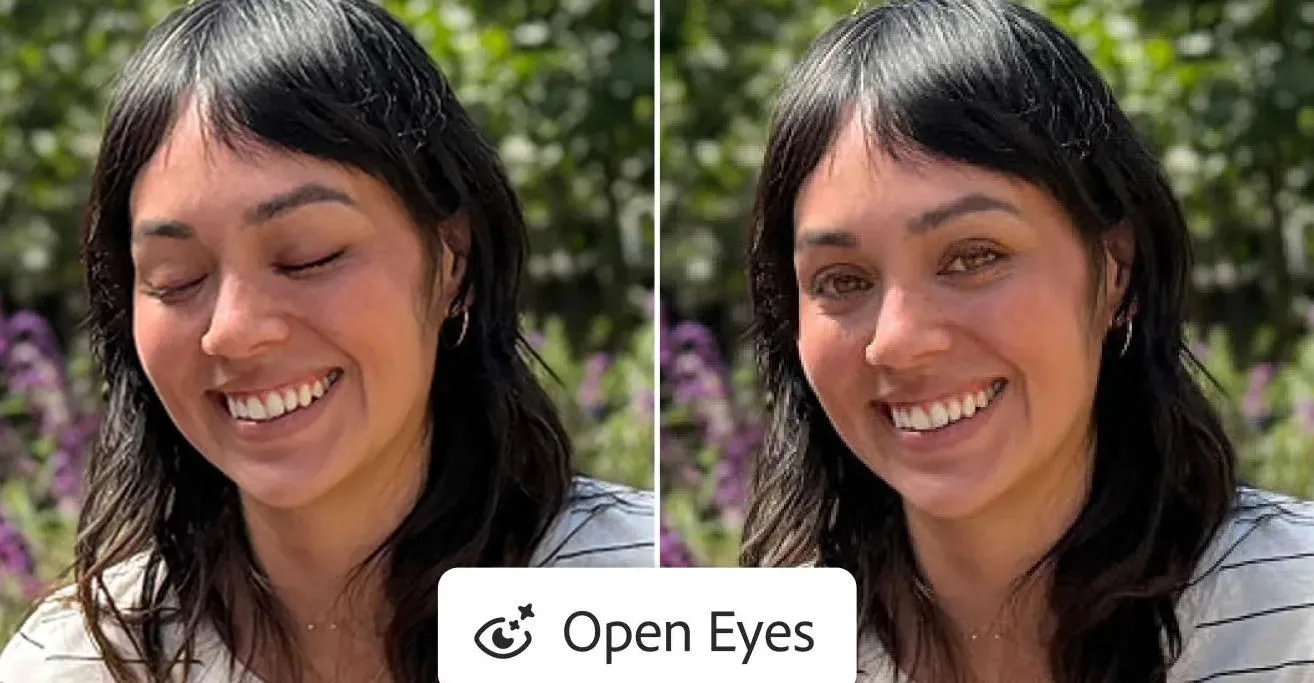
Image: Adobe Lightroom mobile can now open closed eyes in photos with a simple tap · Source
Adobe Lightroom mobile now lets users open closed eyes in photos with a single tap using generative AI, matching eye color and lighting from other images of the person in the library.
Adobe has enhanced its Lightroom mobile app for iOS, iPadOS, and Android with a new AI-powered feature to address the common photo issue of people blinking or having closed eyes. Named Open Eyes, this tool leverages generative AI to open closed eyes in photos with just a single tap. When Lightroom detects closed eyes in one or more subjects, it offers an easily accessible Open Eyes Quick Action icon overlay on the image.
Unlike earlier implementations such as Adobe Photoshop Elements, which rely on sourcing replacement eyes from other photos and sometimes produce inconsistent results, Lightroom mobile’s AI generates eye replacements that match the lighting, pose, and characteristics of the subject. It references other photos of the same person in the user’s Lightroom library to accurately replicate eye color, size, and shape, enhancing realism.
While similar fixes can be done manually in Photoshop with generative AI, those are more complex and require subscription access. Lightroom mobile users can try the Open Eyes feature twice for free before being prompted to subscribe to Adobe Creative Cloud plans that provide more AI credit usage.
This update simplifies photo editing by allowing quick correction of closed eyes without needing multiple source images or extensive manual work, directly addressing a widespread photography challenge. Adobe’s integration of generative AI in mobile Lightroom marks a step forward in making professional-grade photo edits more accessible to everyday users.


Sources and original reporting
Read the original source ↗
Comments (0)
No comments yet. Start the discussion.
Write a comment
Comments are published after moderation. Your name and comment will be visible publicly. Account