
Google Gemini Notebook Enhances Creative Control for Slides and Video Overviews
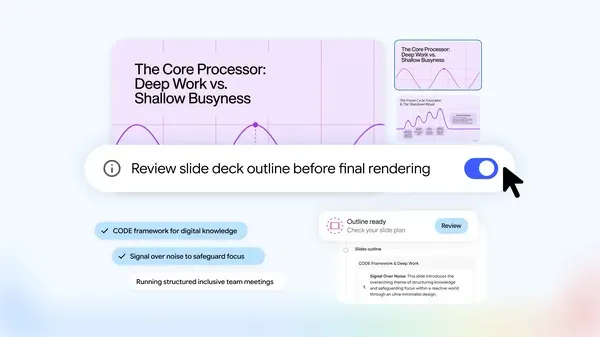
Image: Google · Source
Google's Gemini Notebook introduces a co-creation workflow allowing users to guide content, visual style, and format in slides and video overviews before final production.
Google has announced enhanced co-creation features in its Gemini Notebook product, aimed at giving users more creative control over slide decks and video overviews. These updates reflect user feedback and introduce an interactive, step-by-step process that allows content creators to influence their outputs more precisely.
With the new workflow, users begin in a chat interface by requesting Gemini Notebook to create slides or video summaries based on their source materials. The system then suggests relevant topics for inclusion, which the user can confirm. Once approved, users can steer the project further by adjusting the visual style and format.
A notable addition is the "Review toggle," which, when activated, allows users to see outline notes for slides or producer notes for videos in the studio panel before final rendering. This feature enables users to provide additional feedback, such as adding an executive summary at the start or rearranging scene order. Only after the user approves these elements does Gemini Notebook proceed to generate the final artifact.
For users who have a clear vision from the outset, they can specify detailed prompts to skip initial stages and enter the review phase directly. Alternatively, those seeking a quicker output can bypass the review process entirely and have Gemini Notebook produce artifacts automatically.
These co-creation capabilities began a global rollout to all Gemini Notebook users in the week following the announcement date of October 19, 2026. Google positions these enhancements as ways to combine the efficiency of AI generation with hands-on creative input, improving the user experience in creating professional presentations and video content.
Sources and original reporting
Read the original source ↗
Comments (0)
No comments yet. Start the discussion.
Write a comment
Comments are published after moderation. Your name and comment will be visible publicly. Account