
Apple Mac mini M4: Three Practical Workstation Scenarios

Image: Apple · Source
A source-based look at the 2024 Mac mini M4, with practical planning for video editing, software development and small-business workspaces. Each scenario covers configuration choices, connections, compatibility checks and limitations without claiming hands-on performance results.
What this review covers
The 2024 Mac mini with M4 is best considered as the centre of a particular desk setup, rather than as a collection of impressive specifications. A compact computer still needs a display, input devices, compatible applications, a storage plan and connections appropriate to the work. Apple's specifications establish the available hardware. They do not establish how quickly your project will finish or whether an unfamiliar application will run correctly. The scenarios below are proposed ways to evaluate and deploy the machine, not results from hands-on testing.
This distinction matters because Apple lists both M4 and M4 Pro configurations on the same specifications page. A capability documented for one configuration should not automatically be assumed for another. Identify the exact chip, memory, storage and Ethernet configuration before planning a workstation around it. None of the illustrative configurations below is an Apple-mandated minimum for the example task.
Choose the configuration before arranging the desk
Apple documents a 10-core CPU and 10-core GPU for M4, together with 16GB unified memory configurable to 24GB or 32GB. The M4 Pro configurations have different CPU and GPU options, start with 24GB memory and offer higher memory configurations. Storage choices also differ. These are available options, not a benchmark comparison or a guarantee that a particular workload needs a particular capacity.
For a useful configuration decision, write down the applications you already use, the files they handle and the peripherals you need. Check the application's current requirements and Apple-silicon compatibility in its own documentation. Estimate storage from your existing projects rather than from an arbitrary recommendation. Treat any unfamiliar workload as something to validate with a representative project before relying on it for paid work or a deadline.
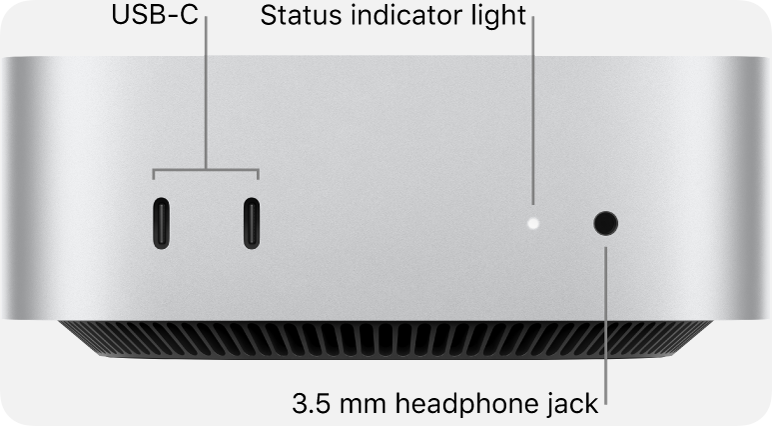
The physical installation deserves similar attention. Apple gives dimensions of 12.7 by 12.7 centimetres and a height of approximately five centimetres. That describes the computer, not the space needed by cables, a display stand or attached storage. Choose a position where you can reach the front connections and where the operating conditions meet Apple's published requirements. A compact enclosure does not remove the need to plan the rest of the workspace.
Scenario one: a practical video-editing workstation
Consider an independent editor who wants one desk for organising footage, editing a sequence and reviewing the result. Apple's specifications list hardware acceleration for H.264, HEVC, ProRes and ProRes RAW, along with AV1 decoding. These are relevant capabilities to investigate, but they do not promise real-time playback for every combination of footage, effects and application. The editor's actual codec, resolution and software remain essential inputs to the decision.
Start by identifying the formats used by a representative project and checking how the chosen editing application supports them on the exact Mac configuration. Next, estimate the space required for source footage, working files, exports and a separate backup. If attached storage is part of the plan, check its interface and the application's guidance. Keep the working-storage decision separate from the backup decision: being able to access a project is not the same as being able to restore it after a failure.
For the displays, decide which screen will show the timeline and which will show the preview or reference material. Consult Apple's configuration-specific display combinations before choosing monitors or adapters. A plan involving several displays must account for resolution, refresh rate and connection type together; counting available sockets is insufficient. Connect only the proposed combination that the specifications support, then confirm the desired modes are available in the completed setup.
The acceptance check is an actual representative project in the intended application. Assess whether playback, export, peripheral access and file management meet your needs. This review supplies no playback measurements or rendering times. If the workflow misses a deadline or behaves inconsistently, investigate the application, media format, storage path and configuration instead of assuming that a larger memory figure will necessarily solve the problem.
Scenario two: an organised development desk
A second example is a developer who wants an editor, documentation and a test application visible at once. Here, display support and peripheral connections may matter as much as the processor specification. The planning task is to establish a usable development environment, not to assume compatibility with every tool because the machine runs macOS.
Begin with a list of your essential development applications and dependencies. Check their current macOS and Apple-silicon support using their own documentation. Include any components that depend on a different architecture or on a particular operating system. If a workflow involves virtualisation or containers, investigate that software separately; Apple's hardware specifications alone do not establish that the chosen environment will work. Do not purchase a configuration around an unverified compatibility assumption.
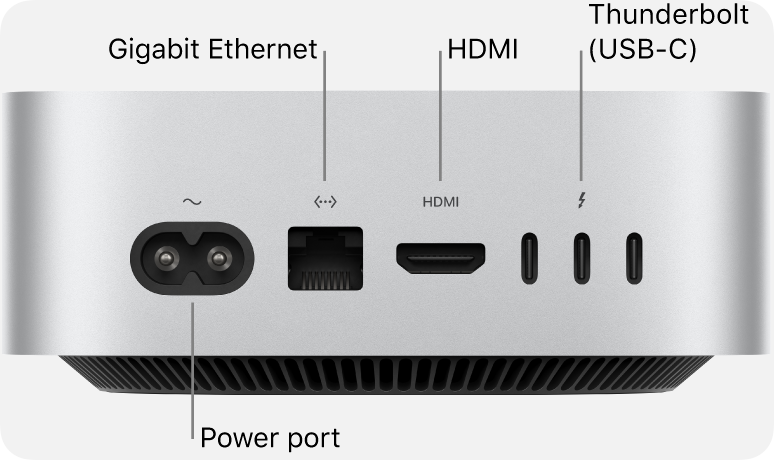
Then plan the screen arrangement and connections. Apple's specifications distinguish the rear Thunderbolt capabilities of the M4 and M4 Pro models. They also list front USB-C connections, HDMI and Ethernet options. Match each peripheral to a documented connection, accounting for any adapters and their limitations. For a wired development environment, verify what the local switch and network support rather than treating the optional Ethernet capability as an automatic end-to-end speed improvement.
A successful deployment would mean that a representative project can be opened, built and checked in the environment you require, with the intended displays and peripherals functioning correctly. These are checks to perform, not promised results. Record any workarounds so that the environment can be reproduced. A workstation also needs a recovery plan: retain the information needed to restore projects and dependencies, and verify the chosen backup method using that method's documentation.
Scenario three: a shared small-business workspace
For a small office, the Mac mini may be considered for an individual employee's workspace that uses shared business applications and files. This is different from assuming it is a ready-made multi-user server. The specifications page does not establish how an arbitrary server application, account policy or backup product should be configured. Those decisions require the relevant software and service documentation.
Begin by identifying the employee's daily tasks, required applications, files and access rules. Check whether each business application supports the intended macOS environment. If files are provided by an existing company service, confirm that service's supported access method and permissions. Keep sensitive information within the organisation's approved arrangements. A proposed workflow should fit the business's access policy rather than creating a new informal repository merely because the computer has spare storage.
Plan the network and peripherals around those tasks. Apple lists Wi-Fi 6E, Bluetooth 5.3 and a standard Gigabit Ethernet connection with a configurable 10Gb Ethernet option. These documented interfaces allow different installation choices. They do not establish the performance of the office's broadband connection, switch, file service or wireless coverage. Check the capabilities of those components before deciding whether a different Ethernet configuration would have practical value.
Before the workspace becomes part of normal operations, validate sign-in, required application access, display settings, printing or other necessary peripherals, and the organisation's chosen recovery process. Use the relevant application and peripheral documentation for requirements not established by Apple's hardware page. The goal is a repeatable, supportable workspace. This review does not claim that the Mac mini supplies a specific server feature or a particular security outcome.
Display and connection limits need a written plan
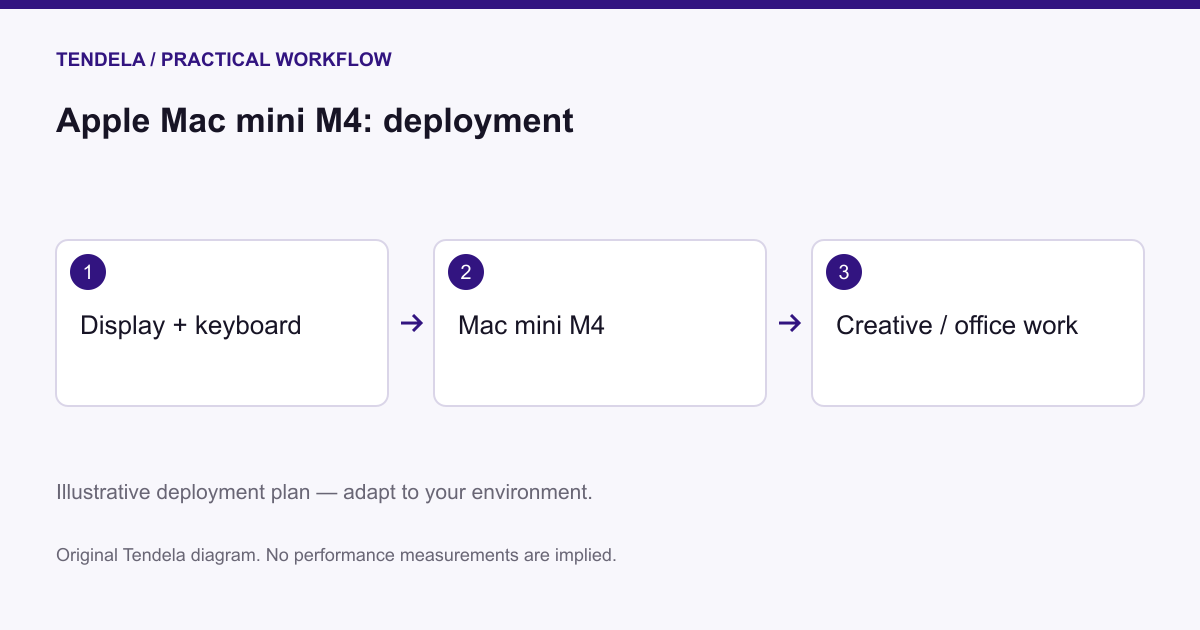
Apple documents several supported display combinations, and the limits depend on whether the machine uses M4 or M4 Pro. Write down the exact proposed display resolution, refresh rate and connection for every screen. Compare the combination with the specifications rather than extracting the highest number from a separate example. A display arrangement appropriate to one connection mode may not describe another arrangement.
The same approach applies to storage and network connections. Make a simple inventory of the devices that must be attached at the same time, including their cable types. Check documentation for each external device and any adapter. Interface specifications describe supported capabilities; they do not measure your transfer speed or the performance of the software using that interface. Avoid turning theoretical compatibility into a promise about completed work.
Maintenance, limitations and the decision to deploy
The practical cost of a workstation includes keeping the environment understandable. Document its exact configuration, applications, connection arrangement and recovery procedure. Check update and compatibility guidance before making changes that affect an essential workflow. Test the recovery process you choose rather than assuming that the existence of a backup file proves it can restore a usable working environment.
The Mac mini's documented configuration options provide several possible foundations for a compact desk. Whether a foundation is suitable depends on the intended application, display arrangement, peripherals and support requirements. Users with unverified software dependencies or workloads that need measured performance should resolve those uncertainties first. A specification-based review can organise the investigation; it cannot replace compatibility confirmation or a representative workload test.
This analysis uses Apple's official specifications for the 2024 Mac mini. Its deployment scenarios are illustrative planning examples, not hands-on testing, benchmarks or manufacturer guarantees. Confirm application-specific requirements and validate the intended workflow before relying on it.
Sources and original reporting
Read the original source ↗
Comments (0)
No comments yet. Start the discussion.
Write a comment
Comments are published after moderation. Your name and comment will be visible publicly. Account