
Final Cut Camera 2.4 on iPhone 18 Pro: Advanced Variable Aperture Filming and Pro Features
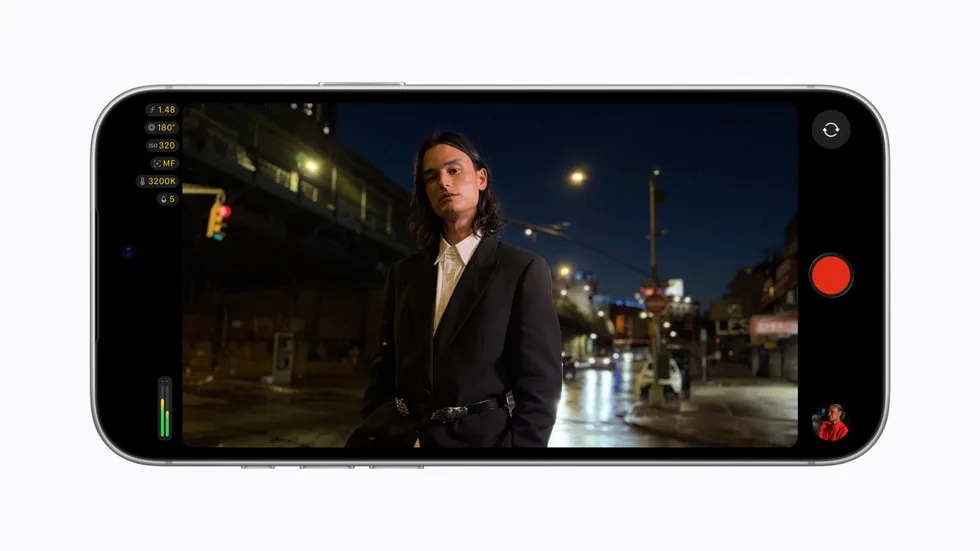
Image: Official product photography / Apple · Source
Final Cut Camera 2.4 introduces variable aperture control on iPhone 18 Pro, redesigned interface, and professional enhancements like video scopes, clean SDI out, and genlock offset with iOS 27, enhancing mobile video production workflows.
Physical Design and Product Variants of Final Cut Camera
Final Cut Camera is an iPhone app designed specifically for professional video capture on Apple devices. Version 2.4 introduces substantial updates optimized for use with the new iPhone 18 Pro. The iPhone 18 Pro features the Fusion Main camera, Apple's most advanced camera system to date, adding hardware capabilities such as a variable aperture mechanism. This model is essential to leverage Final Cut Camera's new aperture control. As a software product, Final Cut Camera is distributed as an update through the App Store or Apple software update infrastructure and requires iOS 27 for some features. There is no standalone hardware; compatibility and functionality depend heavily on the iPhone model, with the iPhone 18 Pro required for variable aperture use.
Interface and Controls Redesign
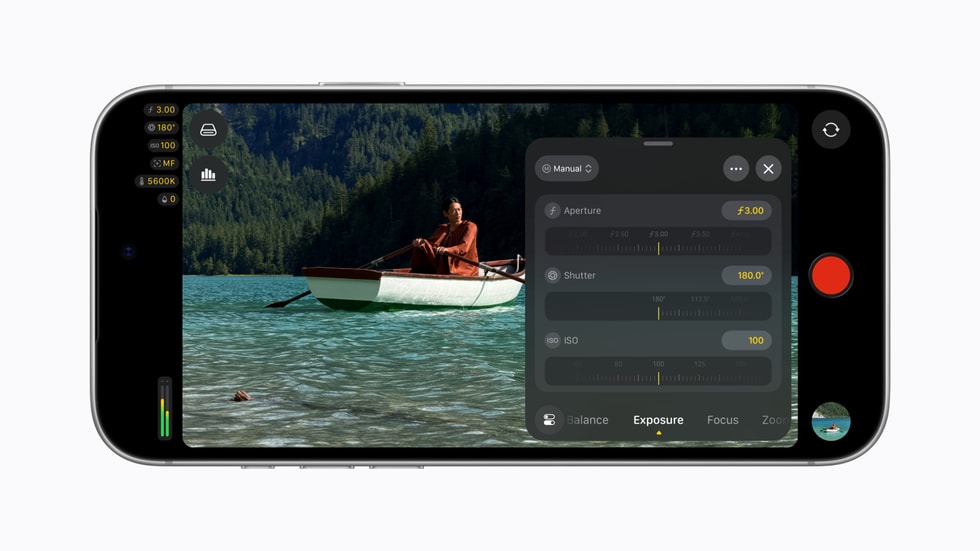
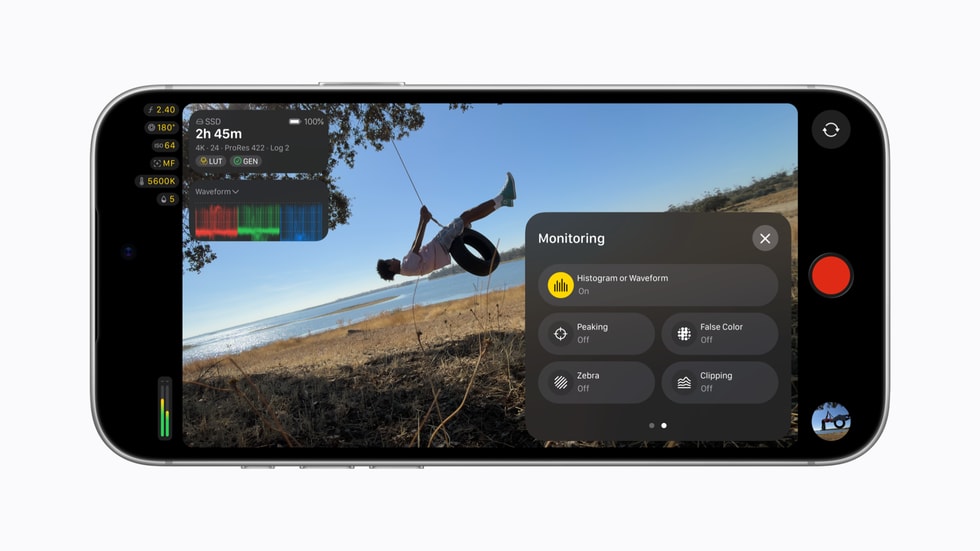
Version 2.4 of Final Cut Camera has been redesigned from the ground up to improve user access and control over critical filming parameters. Users get direct and simplified access to widely used settings including shutter angle, ISO, and white balance, essential for professional-quality video capture. The app now features customizable overlay options, such as false color and clipping indicators. These overlays assist the filmmaker in ensuring ideal exposure by visually flagging under or overexposed areas in real time.
Focus peaking has been enhanced with improved sensitivity control, allowing users to fine-tune the sharpness indicator to their preference. To improve on-set usability, a newly introduced tally light signals when recording is active, aiding in production awareness. Additionally, a novel gesture—a two-finger tap—temporarily clears the viewfinder, permitting the user to compose shots without UI distractions.
Variable Aperture Functionality with iPhone 18 Pro
A key highlight of this update is support for the variable aperture on the Fusion Main camera in the iPhone 18 Pro. This hardware capability enables filmmakers to mechanically adjust the camera's aperture, controlling the lens opening to regulate light admission and depth of field. Final Cut Camera allows precise manual input of aperture values or automatic modes such as shutter priority and aperture priority, giving creators creative and technical flexibility for exposure management and artistic effects.
Variable aperture control on a smartphone marks an industry first, bringing a traditionally DSLR-centric feature to mobile videography. This enables more cinematic video with controlled background blur and better adaptability to lighting conditions.
Advanced Cinematic Features and Workflow Integration
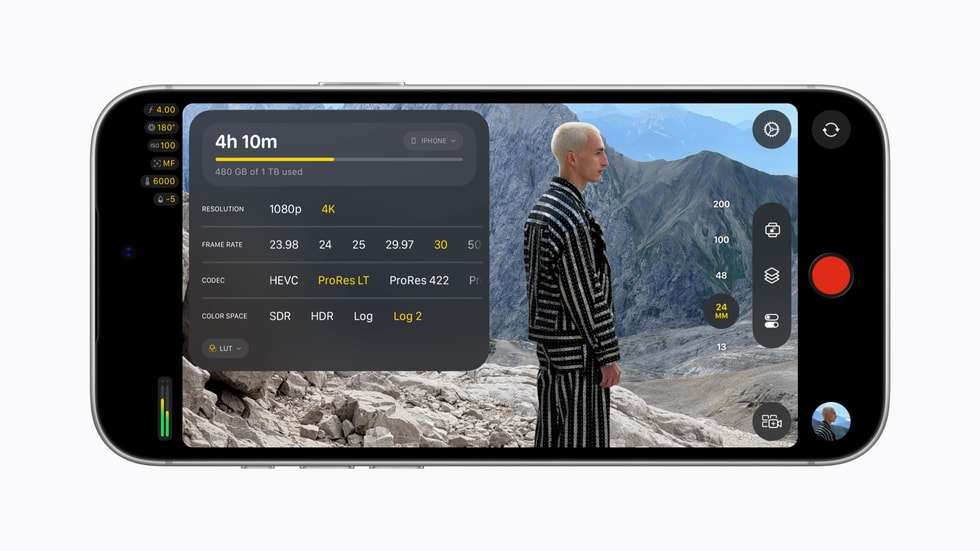
The update also unlocks Cinematic mode effects for standard video recordings, including those captured in ProRes format and Apple Log color profile. This capability allows creators to manipulate focus points and depth of field effects during post-production editing in Final Cut Pro, Apple's professional desktop video software. This integration supports a seamless workflow from capture on the iPhone to high-end editing on Mac systems.
Professional Video Monitoring with iOS 27 Enhancements
Final Cut Camera 2.4 utilizes new iOS 27 features to improve professional video monitoring. It includes support for video scopes such as the RGB Parade and histogram. The RGB Parade displays individual red, green, and blue color channels enabling accurate color balance and exposure assessment. The histogram provides a graphical representation of brightness distribution helpful in avoiding clipping.
Clean SDI out functionality has been added to facilitate broadcast-quality video streaming. Using an HDMI-to-SDI converter, users can output a clean video signal devoid of on-screen UI elements to external monitors or broadcast equipment.
Similarly, genlock offset support helps synchronize the iPhone's video with other genlocked cameras, compensating for latency differences or artifacts caused by recorded displays. This is critical in multi-camera professional environments where video timing and sync are paramount.
Example Workflow 1: Independent Filmmaker Shooting a Narrative Scene
A filmmaker using an iPhone 18 Pro and Final Cut Camera 2.4 aims to shoot a short film with cinematic depth of field.
Prerequisites include the iPhone 18 Pro with iOS 27 installed, the Final Cut Camera app updated to 2.4, and access to Final Cut Pro for editing.
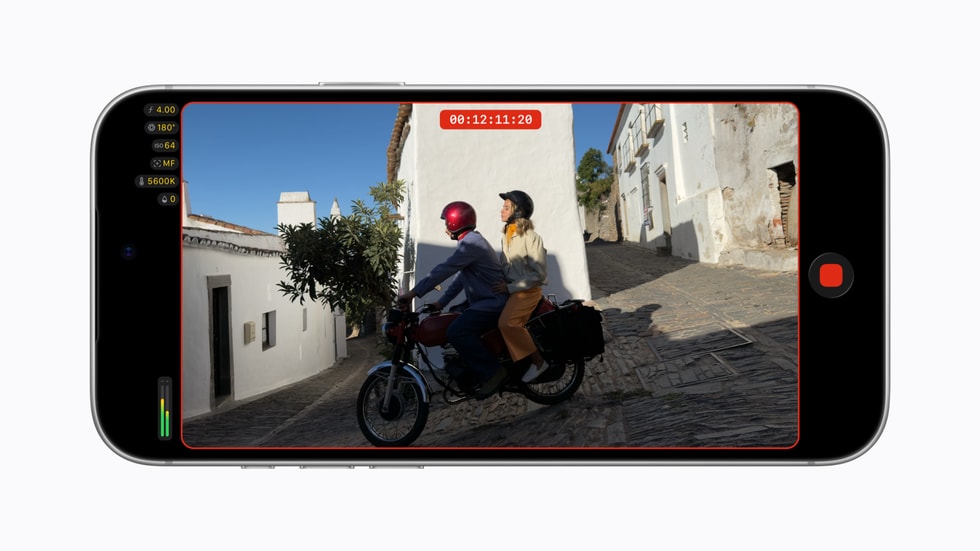
Using the app, the filmmaker manually sets aperture values to obtain shallow depth of field, adjusting exposure using the shutter priority mode as lighting changes. During shooting, false color overlays help maintain correct exposure, and focus peaking aids in keeping subjects sharp. The tally light verifies recording status on set.
Post-shoot, footage with Apple Log and ProRes format is imported into Final Cut Pro, where depth of field and focus points can be adjusted thanks to the Cinematic mode unlock.
Success involves clear tracking of exposure and focus during capture, seamless footage transfer, and flexible focus edits in post. Limitations include the necessity for compatible hardware and mastering the new aperture controls.
Example Workflow 2: Live Event Streaming for an Indie Musician
An indie musician plans to live stream a performance with professional video quality.
Using an iPhone 18 Pro with Final Cut Camera 2.4 on iOS 27 and an HDMI-to-SDI converter, the artist sends a clean video feed to a broadcast encoder.
The RGB Parade and histogram on the iPhone help the artist set accurate color and exposure during the performance. Genlock offset can be configured if additional genlocked cameras are used.
Successful deployment means a clean, professional video signal transmitted with reliable synchronization and accurate colorimetry. Network and equipment compatibility must be verified.
Example Workflow 3: Corporate Training Video Production
A corporate communications specialist is tasked with producing training videos using available iPhone 18 Pro devices.
The specialist uses Final Cut Camera 2.4 to control shutter angle and ISO for consistent video quality. Variable aperture is employed to enhance the visual appeal with selective focus.
The two-finger tap to clear the viewfinder helps avoid distractions during complex setups. Focus peaking and false color overlays improve technical precision.
Post shooting, footage is edited in Final Cut Pro, exploiting cinematic effects unlocked by the app to refine viewer focus.
Success requires proper training on app features and adherence to lighting prerequisites. The solution fits well for in-house productions needing professional-level quality without dedicated camera equipment.
Compatibility and Security Considerations
Final Cut Camera 2.4's advanced features necessitate iPhone 18 Pro hardware and iOS 27 software. Feature availability depends on hardware capabilities such as the Fusion Main camera. Security boundaries are consistent with iOS app sandboxing, with no additional security features related to AI or memory architecture implied by the update.
Backup, Maintenance, and Integration
Video files are captured in industry-standard formats like ProRes and Apple Log, facilitating interoperability and robust workflows. Proper backup strategies should be employed to protect valuable footage. Maintenance involves keeping iOS and Final Cut Camera updated to incorporate ongoing improvements. Integration with Final Cut Pro supports a comprehensive Apple ecosystem video production pipeline.
Suitability and Limitations
Final Cut Camera 2.4 is targeted at professional and prosumer videographers seeking advanced manual controls and integration within Apple's video ecosystem. The variable aperture feature distinguishes the iPhone 18 Pro as a mobile filming tool with DSLR-like capabilities. However, the need for specific hardware limits the user base. Users must be familiar with manual video settings and potentially require additional hardware such as HDMI-to-SDI converters for broadcast workflows.
Conclusion
The Final Cut Camera 2.4 update leverages the iPhone 18 Pro's pioneering Fusion Main camera to introduce variable aperture controls alongside a fully redesigned user interface and expanded professional video features available with iOS 27. These enhancements provide filmmakers, streamers, and video professionals with powerful mobile filming tools that integrate tightly with Apple's editing platforms and accommodate demanding workflows including live streaming and synchronized multi-camera shoots. While advanced, the solution depends on up-to-date hardware and user proficiency with professional video principles.
This review is based solely on the features and technical details documented in the official Apple newsroom announcement dated September 29, 2026, without hands-on testing or external user testimonials.
Sources and original reporting
Read the original source ↗
Comments (0)
No comments yet. Start the discussion.
Write a comment
Comments are published after moderation. Your name and comment will be visible publicly. Account