
Samsung Galaxy Buds On Review: Practical Comfort and AI Convenience in Open-Ear Design
![[Hands-On] Comfort, Convenience, and More: A Day With Galaxy Buds On](https://tendela.com/themes/tendela/assets/images/news/3799-a8769a79c53b452f-full.webp)
Image: Official product photography / Samsung Newsroom · Source
Galaxy Buds On combine an innovative clip-on open-ear design with AI-powered features to deliver comfortable fit, ambient awareness, and hands-free control for all-day wear and diverse daily activities.
Physical Design and Product Appearance
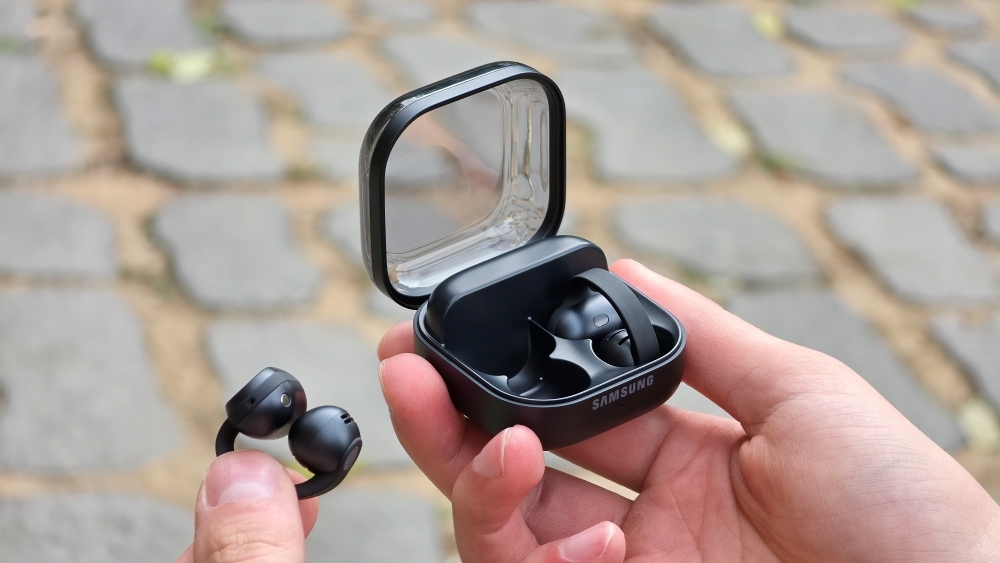
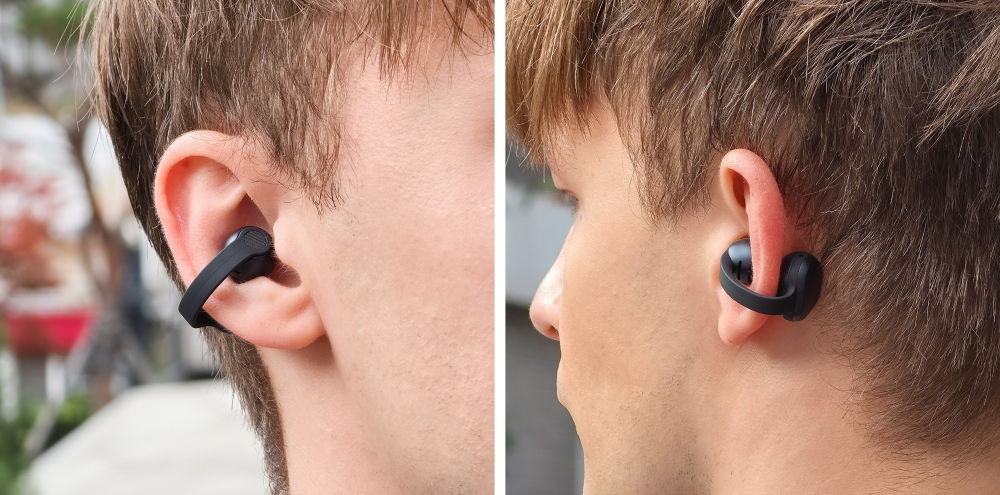
Samsung’s Galaxy Buds On introduce a distinctive clip-on form factor that diverges from traditional in-ear wireless earbuds. Rather than fitting inside the ear canal, these earbuds clip onto the ear, resting lightly on the auricle. This open-ear layout is engineered for extended comfort, preventing the pressure and fatigue often caused by in-ear designs. The earbuds maintain stable positioning, remaining secure even with vigorous head movement, enabling active use without fear of loss or discomfort.
The back surface of each earbud incorporates tactile controls, allowing users to manage playback, voice recording, and other functions through taps and presses without inserting anything into the ear canal. This externalized control strategy contributes to the product's comfort and ease of use, minimizing interference with ear shape or sensitivity.
Interface and Everyday Functionality
Galaxy Buds On provide a multifaceted interaction system combining tactile control, voice commands, head gesture detection, and AI integration. A simple tap on an earbud’s rear starts or pauses music playback. Users can also control track switching or volume adjustments with voice commands such as “Next song” or “Volume up,” eliminating the need to touch the device continuously.
The open-ear design deliberately allows environmental sounds—such as passing bicycles or fellow runners approaching from behind—to be heard alongside music, enhancing situational awareness particularly important during outdoor activities. This contrasts with sealed earbuds that isolate users fully and risk safety by blocking ambient audio cues.
Audio Quality and Sound Features
Though positioned outside the ear canal, Galaxy Buds On incorporate Samsung’s TwinBoost speaker technology, delivering an enriched bass experience and fuller sound relative to previous Galaxy Buds models. This dual-speaker solution aims to mitigate the natural acoustic challenges posed by an open-ear format, where sound leakage and reduced isolation are inherent compromises.
To address sound leakage, the earbuds include an Audio Leakage Reduction feature. This technology diminishes audio bleeding into the surrounding environment, making Galaxy Buds On a reasonable option for use in shared spaces such as offices, where excessive sound leakage could cause disturbance.
Voice Call Clarity and Communication
The Galaxy Buds On maintain call quality even in noisy locations, such as crowded subways, through the Intelligent Clear Call system. This setup integrates three microphones with a bone conduction-based Voice Pickup Unit Sensor and employs machine learning algorithms to isolate the speaker’s voice while suppressing background noise, resulting in clearer communication.
AI-Powered Features and Hands-Free Control
Samsung equips Galaxy Buds On with AI-driven features designed to simplify user interaction and multitasking. Beyond voice commands controlling music playback and volume, the earbuds recognize head gestures, allowing users to nod to answer incoming calls or shake their head to decline them. Additional gesture commands include checking message notifications and dismissing alarms without needing to use hands.
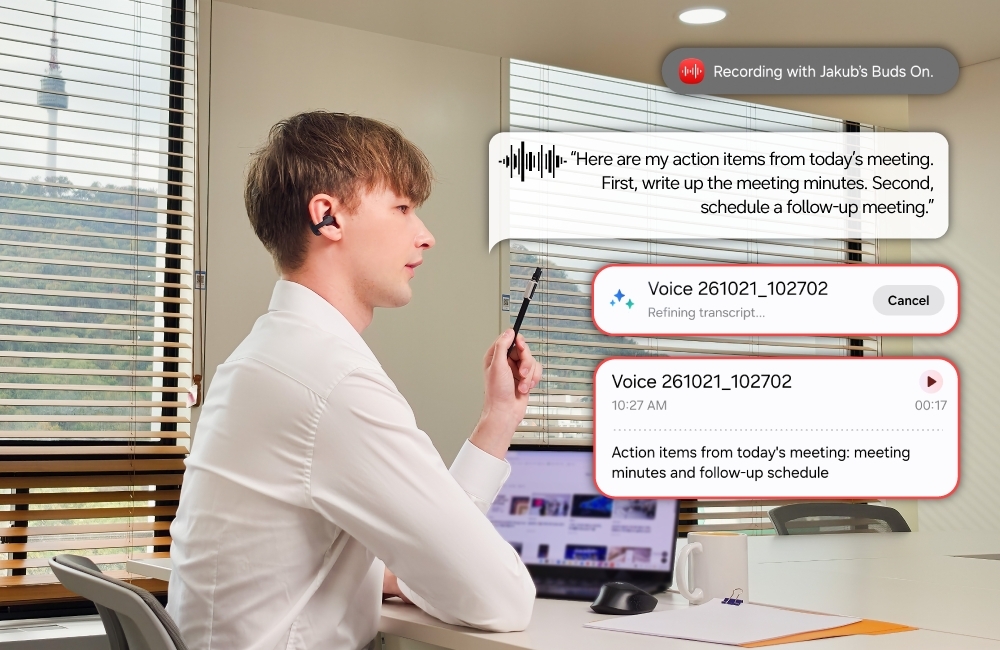
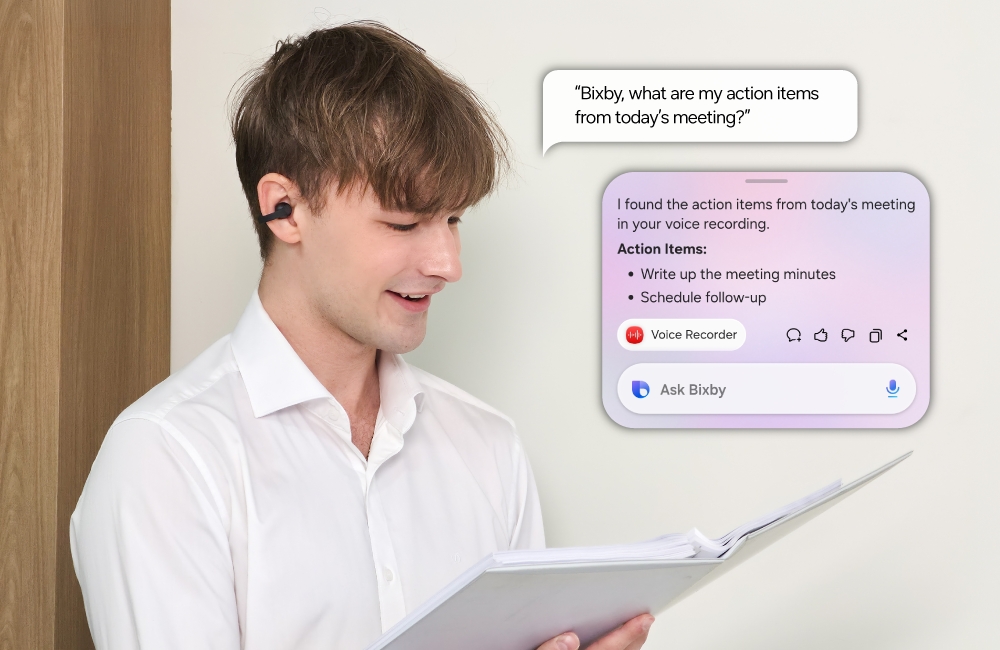
The Quick Voice Memo feature facilitates instant note-taking by pressing and holding the earbud’s back, which immediately initiates recording. These voice memos can later be retrieved through the Bixby voice assistant, who can read aloud stored to-do lists, reducing the need to navigate apps manually.
Practical User Scenario 1: Outdoor Running
User: An active runner wanting route information and situational awareness while listening to music.
Prerequisites: Smartphone with voice assistant functionality and access to Gemini Live app.
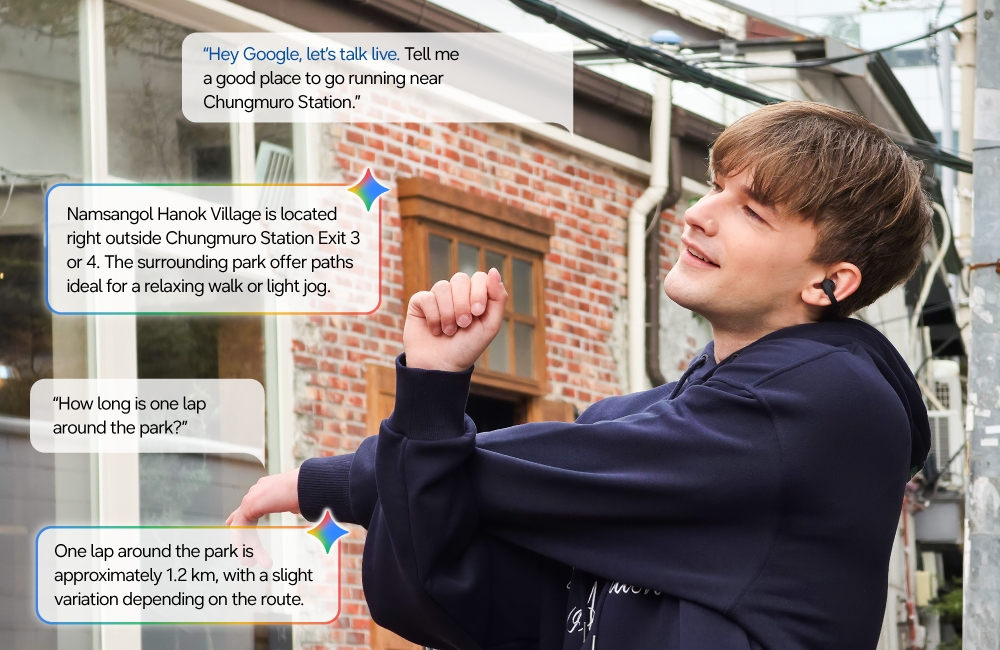
Steps: Before the run, the user invokes the voice assistant by saying “Hey Google, let’s talk Live” to request route recommendations and details such as distances and landmarks. During running, music playback is controlled through taps or voice commands. The clip-on open-ear design allows the runner to hear ambient sounds like cyclists or other runners approaching from behind. Volume and track adjustments can be done hands-free using voice commands.
Successful Deployment: The user remains informed about routes, enjoys uninterrupted music, and maintains environmental awareness for safety during running.
Limitations: Requires a reliable internet connection and compatible voice assistant setup. The open-ear design does reduce noise isolation, making loud environmental noise potentially interfere with audio playback.
Practical User Scenario 2: Shared Workspace Use
User: Office worker in an open-plan environment needing to focus while remaining perceptive of surroundings.
Prerequisites: Bluetooth connection with smartphone or computer and understanding of Audio Leakage Reduction feature.
Steps: The user wears Galaxy Buds On to listen to music or take calls while remaining alert to coworkers. Audio Leakage Reduction technology minimizes audible sound escaping from the earbuds to reduce potential distraction to colleagues. During breaks or post-meetings, Quick Voice Memo can be used by pressing and holding the earbud’s back to record notes. Bixby retrieves and reads notes aloud when prompted.
Successful Deployment: The user balances productivity and awareness, communicating clearly without isolating from the work environment or disturbing nearby coworkers.
Limitations: Some sound leakage is inevitable due to open-ear design. Voice assistant and AI functions may have reduced responsiveness in noisy office scenarios.
Practical User Scenario 3: Hands-Free Call Management
User: Multitasking individual needing to manage incoming calls without using hands.
Prerequisites: Active Bluetooth connection and enabled gesture and voice command controls.
Steps: When receiving a call, the user nods to answer or shakes their head to decline. During the call, Intelligent Clear Call technology leverages multiple microphones and bone conduction sensing to maintain voice clarity and suppress background noise.
Successful Deployment: The user efficiently handles phone calls hands-free with clear audio quality even in noisy public places.
Limitations: Gesture recognition effectiveness depends on user’s movement accuracy and environmental conditions. Call clarity may vary with intensity and nature of ambient noise.
Practical User Scenario 4: Quick Note-Taking During Commuting
User: A commuter wishing to capture thoughts and reminders without accessing a phone.
Prerequisites: Bixby voice assistant setup paired with Galaxy Buds On.
Steps: While traveling, the user presses and holds the back of the earbud to begin a Quick Voice Memo, speaking to record tasks or reminders. Later, the user requests Bixby to replay the saved notes, enabling hands-free access to important information without stopping or pulling out a device.
Successful Deployment: The commuter efficiently captures and reviews memos during a busy day with minimal distraction.
Limitations: Recording quality depends on ambient noise; the feature requires prior Bixby configuration. Voice memo retrieval depends on software stability and assistant response.
Compatibility, Maintenance, and Security
Galaxy Buds On connect primarily via Bluetooth to compatible smartphones and computers. They support voice assistants including Google Assistant and Bixby to enable AI features and voice controls. Users should verify device compatibility and software support through Samsung’s official documentation.
The earbuds require routine maintenance such as cleaning the clip-on mechanism to preserve comfort and a secure fit. Given the open-ear design, hygiene concerns related to ear canal insertion are minimized, but care regarding exposure to dust and sweat is advised. Charging and firmware updates are managed through Samsung’s apps as per standard wireless earbuds.
Security on Galaxy Buds On relies on standard encrypted Bluetooth data transmission and device pairing authentication. There is no disclosed implementation of dedicated hardware security modules or advanced data isolation techniques beyond these typical safeguards.
Fit and User Profile Considerations
These earbuds suit users who prioritize all-day comfort without the occlusion effects of in-ear models, and who need environmental awareness — such as outdoor athletes, professionals in open workplaces, and individuals relying on intelligent voice and gesture controls. Conversely, users seeking maximum noise isolation or complete audio privacy might find the open design less appropriate.
Conclusion
Samsung Galaxy Buds On offer a unique alternative in the wireless earbud market by emphasizing an open-ear clip-on design that promotes comfort and ambient sound perception. The inclusion of AI-powered features such as voice commands, head gestures, Quick Voice Memo, and Intelligent Clear Call enhance convenience and usability across numerous daily tasks from exercise to work to hands-free communication. While the open-ear format involves tradeoffs in sound isolation and some residual audio leakage, these earbuds align well with users seeking a blend of comfort, ambient awareness, and smart interaction.
--
This review is based entirely on documented information from Samsung Newsroom’s article “[Hands-On] Comfort, Convenience, and More: A Day With Galaxy Buds On” and does not include personal hands-on testing or independent evaluations.
Read the original source ↗
Comments (0)
No comments yet. Start the discussion.
Write a comment
Comments are published after moderation. Your name and comment will be visible publicly. Account