
Google's Gemini App for Mac Automates Repetitive Tasks with New Computer Use Feature
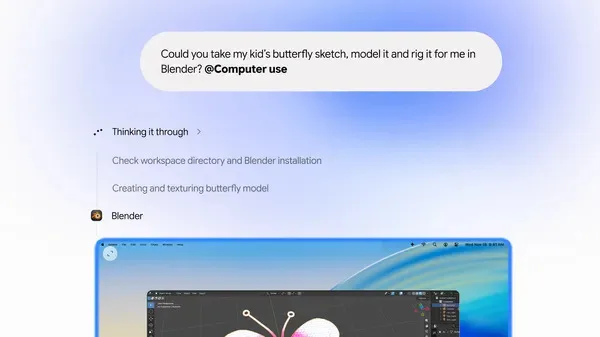
Image: Google · Source
Google’s Gemini app for Mac introduces computer use to automate multi-step tasks by navigating apps and websites in the background, letting users focus on other work.
Google has launched a significant update to its Gemini app for Mac that enables automation of repetitive and multi-step computer tasks. The new "computer use" feature allows Gemini to handle complex workflows involving local files, desktop applications, and websites — performing mouse clicks, typing, navigating menus, and filling forms on behalf of the user.
This functionality operates within an isolated background window, so users can continue using their Macs without interruptions, as their main screen and cursor remain free. Gemini offers a live preview within its chat interface, enabling users to monitor every automated step as it happens.
Privacy and control are core to this feature. Users explicitly grant app permissions to Gemini, can pause automation at any time, and must approve key actions before Gemini executes them. This ensures that users retain full oversight of the automated processes.
Several practical use cases are highlighted by Google. Creative professionals can batch color-grade photos or prepare intricate 3D scenes in their preferred design software. Users handling shipping can extract details like weights and dimensions from PDFs to auto-fill multi-box shipping forms. Additionally, Gemini can gather live data from dashboards across regions to create Google Slides presentations, or analyze photos, research prices, and list items on resale platforms automatically.
Currently, the computer use feature in Gemini for Mac is available in English for users in the United States. Users can download the updated Gemini app from gemini.google/mac to start automating time-consuming tasks and improving productivity.
This development reflects Google’s push to integrate more advanced automation and AI capabilities directly into user workflows, reducing repetitive manual effort while maintaining user control and security.

Sources and original reporting
Read the original source ↗
Comments (0)
No comments yet. Start the discussion.
Write a comment
Comments are published after moderation. Your name and comment will be visible publicly. Account